
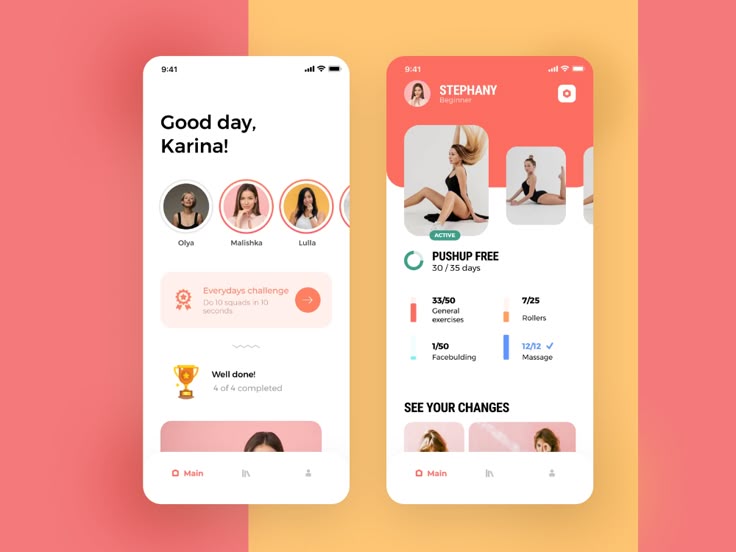
Before launching a full-fledged mobile app, it’s crucial to create a prototype. A mobile app prototype is a visual representation of your app’s functionality and design, allowing you to test ideas, gather feedback, and make improvements before development.
In this guide, we’ll take you through how to create a mobile app prototype, step by step. Whether you’re a startup in Kenya or an established business looking to develop an app, this process will save time and resources while ensuring a smooth development phase.
1. Why You Need a Mobile App Prototype
Prototyping is an essential step in mobile app development. It helps in:
- Visualizing the App’s Concept – See how your app will look and function before coding begins.
- Identifying Design Flaws Early – Catch UI/UX issues before development.
- Gathering Feedback from Users – Understand user preferences before launching the final version.
- Saving Time and Money – Avoid costly revisions later in the development process.
2. Steps to Creating a Mobile App Prototype
Step 1: Define the App’s Goals and Features
Before you start designing, clearly define:
- The purpose of the app – What problem does it solve?
- Target audience – Who will use it?
- Core features – What functionalities are necessary?
For example, if you’re developing a food delivery app, key features may include:
- A restaurant listing
- Menu browsing
- Order placement
- Payment integration
Having a clear roadmap helps in designing a focused prototype.
Step 2: Research Competitors and Industry Trends
Look at successful apps in your industry and analyze their designs. Identify what works well and what can be improved.
Tools to research app designs:
- Google Play Store & Apple App Store – Browse top-rated apps.
- Dribbble & Behance – Find design inspirations.
- User reviews – Understand common issues in similar apps.
This research will guide your design decisions and help create an intuitive user experience.
Step 3: Sketch a Rough Wireframe
A wireframe is a basic sketch of your app’s layout. It outlines:
- Where buttons and menus will be placed.
- How users will navigate the app.
- The general structure of screens.
You can create wireframes using:
- Pen & paper (for quick sketches).
- Online tools like Balsamiq, Sketch, or Figma.
This step ensures clarity in app structure before adding design elements.
Step 4: Choose a Prototyping Tool
Once you have wireframes, the next step is creating an interactive prototype. There are many tools available, such as:
- Figma – Great for collaborative prototyping.
- Adobe XD – Ideal for high-fidelity designs.
- InVision – Converts designs into clickable prototypes.
- Proto.io – Allows interactive app simulation.
These tools let you create clickable prototypes, so users can interact with the design before coding begins.
Step 5: Design the User Interface (UI)
Now, it’s time to bring your prototype to life with colors, fonts, and images.
- Use a clean, modern design that aligns with your brand.
- Ensure readability with easy-to-read fonts.
- Choose a color scheme that enhances usability.
- Follow UI/UX best practices for smooth navigation.
💡 Tip: Keep the design minimalistic to avoid overwhelming users.
Step 6: Add Interactivity and Transitions
Your prototype should mimic real app interactions, including:
- Tap gestures – Users can click on buttons.
- Swiping actions – Navigate between screens.
- Animations – Simulate smooth transitions.
Most prototyping tools allow you to link screens together, making the experience feel like a real app.
Step 7: Gather Feedback and Iterate
Before finalizing your prototype, test it with:
- Team members – Get internal feedback.
- Potential users – Observe how they interact with the design.
- Stakeholders & investors – Show them the concept before development.
💡 Tip: Use feedback to make improvements before moving to the coding phase.
3. Best Practices for a Successful Mobile App Prototype
- Keep it simple – Focus on key features first, avoid unnecessary complexity.
- Use real content – Placeholder text can be misleading; use actual labels.
- Prioritize navigation – Users should easily understand how to move through the app.
- Optimize for mobile screens – Ensure it looks great on different screen sizes.
4. What Comes After Prototyping?
Once your prototype is refined and approved, you can move to app development. This involves:
- Front-end development – Coding the app interface.
- Back-end development – Setting up databases and server connections.
- Testing – Ensuring smooth performance and fixing bugs.
- Launch & marketing – Releasing the app and promoting it to users.
Conclusion
A mobile app prototype is a crucial step in turning an app idea into reality. It helps refine your concept, improve the user experience, and reduce development costs. By following the steps in this guide, you can create an interactive prototype that brings your vision to life.
At Techrahisi, we specialize in app prototyping and development to help businesses launch successful mobile apps in Kenya. Need help building your next app? Let’s talk!
📞 Call us: +254726572527
📧 Email: developers@techrahisi.co.ke
🌍 Visit: techrahisi.co.ke