
In the digital marketing space, banner ads play a crucial role in capturing attention and driving traffic. Whether used in Google Ads, social media, or websites, well-designed banners can significantly boost engagement and conversions. However, many banners fail because they are cluttered, unattractive, or fail to communicate a clear message.
This article will explore essential design principles, strategies, and best practices for creating banners that attract clicks and deliver results.
What Makes a Banner Click-Worthy?
A high-performing banner must grab attention, convey a message quickly, and encourage action. The key elements of an effective banner include:
- Clear and compelling visuals
- Concise and persuasive messaging
- A strong call-to-action (CTA)
- Proper use of colors and contrast
- Optimized dimensions for different platforms
Let’s dive deeper into these factors.
1. Keep the Design Simple and Focused
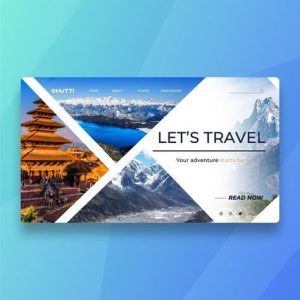
A cluttered banner confuses users and reduces engagement. Simplicity is key when designing an ad that grabs attention.
- Avoid excessive text—focus on a short, impactful message.
- Use a clean layout with plenty of white space.
- Stick to a single focal point (product, offer, or CTA).
A banner should be visually appealing while instantly communicating its purpose.
2. Use High-Quality Images and Graphics
Visuals are the first thing users notice in a banner. Poor-quality images can make your ad look unprofessional and untrustworthy.
- Use sharp, high-resolution images that relate to your message.
- Avoid stock photos that look generic or staged.
- Consider using custom illustrations or branded visuals to stand out.
If using a product image, ensure it is well-lit, clear, and relevant to the target audience.
3. Create a Strong Call-to-Action (CTA)
Your banner’s CTA should be clear, action-oriented, and persuasive. It tells the viewer what to do next.
Effective CTA Examples:
- Shop Now (for e-commerce banners)
- Get a Free Trial (for software and services)
- Sign Up Today (for newsletters and courses)
- Learn More (for informational content)
CTA Best Practices:
- Use contrasting colors to make the CTA button stand out.
- Keep the text short (2-4 words work best).
- Use urgency or incentives (e.g., “Limited Offer – Sign Up Now”).
A weak CTA results in low engagement, so make sure it is visually prominent.
4. Optimize Colors and Contrast for Visibility
Color psychology plays a crucial role in how users react to a banner. Different colors evoke different emotions and influence decisions.
Choosing the Right Colors:
- Red & Orange – Attention-grabbing, urgency, excitement.
- Blue & Green – Trust, security, and calmness.
- Black & Gold – Luxury, sophistication, and exclusivity.
Contrast Tips:
- Ensure the text contrasts well with the background.
- Use bold colors for CTAs and key elements.
- Stick to a brand-consistent color scheme for familiarity.
Proper color use can make the difference between a banner that gets ignored and one that gets clicked.
5. Ensure Text Is Readable and Concise
Since banners are often displayed briefly, the message should be easily readable at a glance.
Text Guidelines:
- Use large, bold fonts for headlines.
- Keep the font style clean and modern (avoid overly decorative fonts).
- Limit text to 5-10 words for maximum impact.
A good banner delivers the message quickly without overwhelming the viewer with too much information.
6. Optimize Banner Sizes for Different Platforms
Banners come in different sizes, depending on where they will be displayed. Ensuring the correct dimensions will prevent cropping issues and improve visibility.
Common Banner Sizes:
Google Display Ads:
- 300×250 (Medium Rectangle)
- 728×90 (Leaderboard)
- 160×600 (Wide Skyscraper)
- 320×50 (Mobile Banner)
Social Media (Facebook, Instagram, LinkedIn):
- 1200×628 (Standard Ad Size)
- 1080×1080 (Square Ads)
- 1080×1920 (Stories Ads)
Always test your banner on different screen sizes to ensure it looks good on all devices.
7. Use Motion and Animation (If Applicable)
Animated banners often perform better than static ones because they attract more attention. However, they should be used carefully.
- Keep animations simple (no more than 3-5 seconds).
- Ensure the movement supports the message and doesn’t distract.
- Use smooth transitions rather than flashy effects.
Platforms like Google Display Network and social media ads allow animated banners (GIFs, HTML5, or short videos).
8. A/B Test Different Variations
Testing different versions of a banner can help determine which design gets the best response.
Elements to Test:
- Different CTA wording (e.g., “Buy Now” vs. “Get Yours Today”)
- Image variations (product-focused vs. lifestyle images)
- Color schemes and contrast
- Different layouts and font styles
A/B testing helps refine the design for maximum conversions.
Conclusion
Creating banners that get clicks online requires a combination of compelling visuals, clear messaging, and strong CTAs. A well-designed banner should grab attention, convey the message instantly, and encourage users to take action.
By following best practices such as simplicity, proper color use, readability, and A/B testing, you can create banner ads that drive engagement and improve marketing performance.
If you need professionally designed banners, Tech Rahisi offers high-quality graphic design services for businesses looking to improve their digital marketing efforts.
Need a custom banner? Contact us today!
📞 Call/WhatsApp: 0726572527
🌐 Visit Tech Rahisi